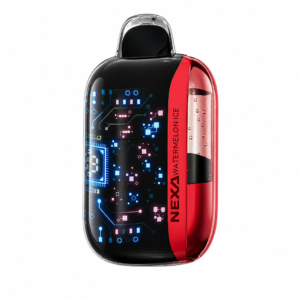
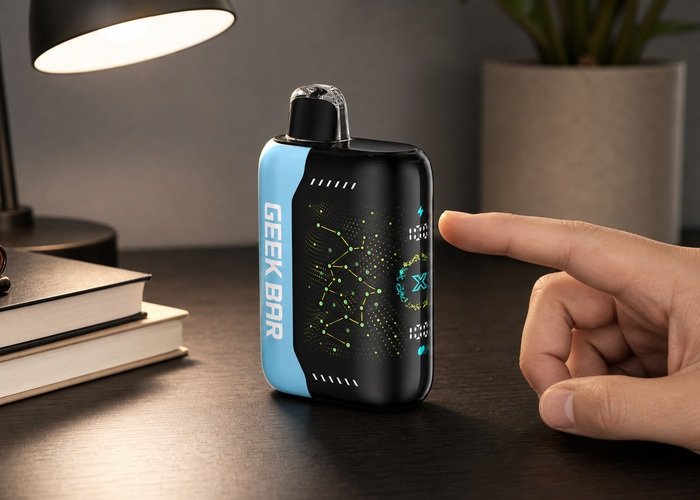
The Geek Bar Pulse X screen combines battery, liquid and operating information in a compact display. Each symbol is best treated as a planning estimate rather than a precision instrument, because electrical load, draw pattern, mode and temperature can change how quickly a reading moves. Review the Geekbar Pulse X product page before deciding.
Identify one area at a time: battery status, liquid trend and selected output mode. Record the reading before and after an ordinary session instead of taking extra draws to force an update. A stable trend is more useful than one isolated percentage or animation. Compare it with the Pulse X battery-percentage guide.
The display cannot make an unsafe device safe. Stop using or charging the product if it becomes unusually hot, swells, leaks, smells chemical, smokes, sparks, hisses while untouched or activates without a draw. For a related decision, see the Pulse X airflow guide.

Quick decision table
| Decision area | What changes | Practical choice |
|---|---|---|
| Battery icon | The battery area estimates remaining electrical charge and may move in programmed steps. | Compare it across normal sessions rather than expecting laboratory precision. |
| Liquid icon | The liquid display supports replacement planning but cannot directly measure wick condition. | Read it with flavor, vapor and exterior condition. |
| Mode indication | Regular and stronger output modes can change warmth and consumption. | Confirm the selected mode before comparing battery or liquid trends. |
| Charging animation | A changing battery symbol can show that USB power is recognized. | Also monitor temperature, cable stability and completion. |
| Fast step change | Load and recalculation can make a value fall or rise after a draw or charge. | Observe whether the pattern repeats under the same routine. |
| Screen stays lit | A lit screen alone does not prove normal airflow or heating operation. | Use only safe exterior checks and avoid repeated forced draws. |
| Dim or blank display | Low charge, sleep behavior or a fault can affect the screen. | Try one supervised compatible charge only if the device is intact and cool. |
| Safety override | Physical heat, leakage, swelling or self-activation matters more than an icon. | Stop immediately and seek retailer guidance. |
Manufacturer information is useful for confirming names and specifications, so check the official Pulse X product information. It should be treated as a starting point rather than proof that every adult will experience the same duration, flavor intensity or meter pattern.
Public discussion can reveal questions that specification pages miss. The public Pulse X display discussion highlights why battery behavior, screen readings and flavor expectations should be observed over time instead of judged from one draw or one percentage change.
Nicotine is addictive and these products are intended only for adults of legal purchasing age. The FDA overview of electronic nicotine products provides broader product context, while the CDC information on e-cigarettes explains health considerations that belong in any purchase decision.
Battery icon
The battery area estimates remaining electrical charge and may move in programmed steps. Compare it across normal sessions rather than expecting laboratory precision. Make the comparison under one ordinary routine: same general draw style, same storage conditions and the same mode for a full observation period. Changing several variables at once makes the result difficult to interpret.
Write down the starting battery and liquid indicators, the selected mode, any charging event and the moment flavor or warmth changes. A short log is more useful than chasing a promised total because it shows whether the product behaves consistently for you. Stop the observation immediately if the case becomes unusually warm, leaks, swells, smells chemical or continues making sound while untouched.
Liquid icon
The liquid display supports replacement planning but cannot directly measure wick condition. Read it with flavor, vapor and exterior condition. Make the comparison under one ordinary routine: same general draw style, same storage conditions and the same mode for a full observation period. Changing several variables at once makes the result difficult to interpret.
Write down the starting battery and liquid indicators, the selected mode, any charging event and the moment flavor or warmth changes. A short log is more useful than chasing a promised total because it shows whether the product behaves consistently for you. Stop the observation immediately if the case becomes unusually warm, leaks, swells, smells chemical or continues making sound while untouched.
Mode indication
Regular and stronger output modes can change warmth and consumption. Confirm the selected mode before comparing battery or liquid trends. Make the comparison under one ordinary routine: same general draw style, same storage conditions and the same mode for a full observation period. Changing several variables at once makes the result difficult to interpret.
Write down the starting battery and liquid indicators, the selected mode, any charging event and the moment flavor or warmth changes. A short log is more useful than chasing a promised total because it shows whether the product behaves consistently for you. Stop the observation immediately if the case becomes unusually warm, leaks, swells, smells chemical or continues making sound while untouched.
Charging animation
A changing battery symbol can show that USB power is recognized. Also monitor temperature, cable stability and completion. Make the comparison under one ordinary routine: same general draw style, same storage conditions and the same mode for a full observation period. Changing several variables at once makes the result difficult to interpret.
Write down the starting battery and liquid indicators, the selected mode, any charging event and the moment flavor or warmth changes. A short log is more useful than chasing a promised total because it shows whether the product behaves consistently for you. Stop the observation immediately if the case becomes unusually warm, leaks, swells, smells chemical or continues making sound while untouched.
The video below offers a visual reference for the product family. Use it to recognize exterior controls and proportions only; do not copy any disassembly, internal battery access or refill procedure.
Before watching, place your own device on a stable nonflammable surface and leave it disconnected. A video demonstration cannot confirm the authenticity or condition of the item in your hand.
After watching, return to the decision table and identify one difference that affects your normal day. Decorative animation is less important than safe charging, predictable draw behavior, flavor fit and a clear return path.
Pause before testing anything. If the device is warm, hissing, leaking or activating on its own, do not take another draw to reproduce the symptom. Move people away and follow retailer or local emergency guidance.
For a normal intact device, compare only exterior behavior: display response, airflow control, mode indication, draw consistency and charging status. Never pry at seams or remove a mouthpiece to investigate a difference.
Keep the box, order record and security result until the device has completed several ordinary sessions. These details make a retailer conversation much clearer if behavior does not match the documented model.
Fast step change
Load and recalculation can make a value fall or rise after a draw or charge. Observe whether the pattern repeats under the same routine. Check the choice against where the device will actually be kept: a desk organizer, a protective travel pouch or a secure high cabinet. Loose pockets with coins or keys are a poor storage test.
Separate preference from fault. A brighter screen, sweeter flavor or warmer draw may be normal for a chosen model or setting; leakage, swelling, smoke, sparks, persistent hissing and uncommanded activation are stop-use signals. If the issue is only preference, use the retailer’s normal return rules rather than attempting a modification.
Screen stays lit
A lit screen alone does not prove normal airflow or heating operation. Use only safe exterior checks and avoid repeated forced draws. Check the choice against where the device will actually be kept: a desk organizer, a protective travel pouch or a secure high cabinet. Loose pockets with coins or keys are a poor storage test.
Separate preference from fault. A brighter screen, sweeter flavor or warmer draw may be normal for a chosen model or setting; leakage, swelling, smoke, sparks, persistent hissing and uncommanded activation are stop-use signals. If the issue is only preference, use the retailer’s normal return rules rather than attempting a modification.
Dim or blank display
Low charge, sleep behavior or a fault can affect the screen. Try one supervised compatible charge only if the device is intact and cool. Check the choice against where the device will actually be kept: a desk organizer, a protective travel pouch or a secure high cabinet. Loose pockets with coins or keys are a poor storage test.
Separate preference from fault. A brighter screen, sweeter flavor or warmer draw may be normal for a chosen model or setting; leakage, swelling, smoke, sparks, persistent hissing and uncommanded activation are stop-use signals. If the issue is only preference, use the retailer’s normal return rules rather than attempting a modification.
Safety override
Physical heat, leakage, swelling or self-activation matters more than an icon. Stop immediately and seek retailer guidance. Check the choice against where the device will actually be kept: a desk organizer, a protective travel pouch or a secure high cabinet. Loose pockets with coins or keys are a poor storage test.
Separate preference from fault. A brighter screen, sweeter flavor or warmer draw may be normal for a chosen model or setting; leakage, swelling, smoke, sparks, persistent hissing and uncommanded activation are stop-use signals. If the issue is only preference, use the retailer’s normal return rules rather than attempting a modification.
A five-minute buyer checklist
- Confirm the exact model, flavor, strength and sealed packaging.
- Open the official brand site independently before using any security code.
- Check the retailer’s return window before first use.
- Choose the normal mode and airflow position you expect to use most.
- Plan a hard, visible charging location away from fabric and heat.
- Keep a protective storage space away from children and pets.
If battery or charging behavior is the deciding factor, read the Pulse X puff-count explanation. For service boundaries, review the support FAQ and warranty information before the return window closes.
Lithium-powered devices require careful end-of-life handling. The EPA lithium-ion battery recycling guidance explains why they should not enter household trash or curbside recycling, and the battery collection locator can help locate an appropriate collection option.
If liquid contacts skin or is swallowed, keep the product away from children and pets and follow the Poison Control guidance on liquid nicotine. For damaged batteries and fire risk, consult relevant CPSC consumer safety resources and local emergency advice.

Store the chosen device upright in a cool, dry place where it cannot be crushed or activated accidentally. Do not leave it in a hot vehicle, direct sun, bedding or a closed bag while charging. A protective case should prevent contact with loose metal and should not trap a warm device.
When support is needed, send the exact model, order record, security result, photographs of the intact exterior, mode, airflow position, starting and current display readings, charging source and a concise timeline. The return and refund policy explains the site’s return route, while the contact team can handle a model-specific question.
The best choice is the model whose normal operating pattern fits your day without requiring constant setting changes or optimistic assumptions. Use the display as a planning aid, keep the product intact and let predictable comfort and supportability outweigh novelty.
For Geek Bar Pulse X screen icons, make the final decision from capacity needs, carry comfort, flavor availability, screen usefulness, charging access and the retailer’s support path. If two models still seem equal, choose the simpler one that meets the routine rather than the one with the largest headline number.
Frequently Asked Questions
Does the larger puff claim guarantee longer personal use?
No. It is a comparison figure shaped by test conditions. Draw length, mode, airflow, temperature and individual habits change real duration.
Should I choose the newest model automatically?
No. Choose the generation whose size, flavor availability, display and charging routine fit your needs.
Can I open a sealed device to compare the battery or liquid?
No. Opening it can expose nicotine liquid, wiring and a lithium-ion cell and can create a fire or poisoning risk.
What should I do if the meter drops in large steps?
Record the trend alongside flavor, vapor and temperature. Stop use for heat, leakage, swelling, odor, smoke, sparks, persistent hissing or self-activation.
Can I charge it overnight?
Do not charge unattended or on fabric. Use a compatible source on a hard nonflammable surface and disconnect after charging completes.
How should I dispose of an exhausted device?
Keep it intact and use an approved collection route for lithium-powered electronic nicotine products; do not place it in household trash or curbside recycling.